-
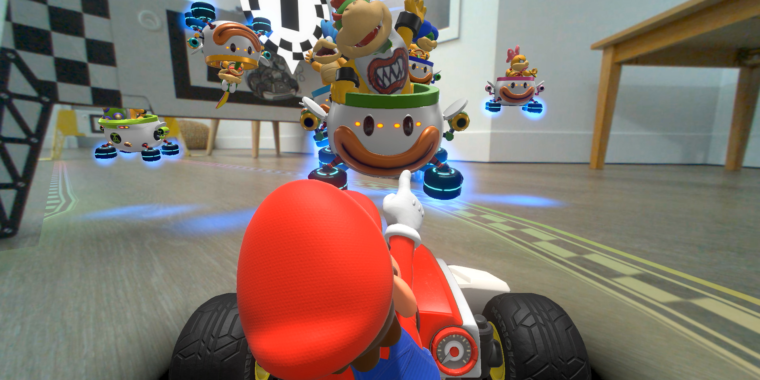
Man, now I want a real-life hover-clown-car RC toy.
-
This underwater stage even affects the sound design for the game.
-
I believe this is the first Mario Kart game where you could say "Look out for that ottoman!"
-
Retro chic.
-
The virtual gate hazards can be arranged on the left, right, or center of the gate.
The toy industry has given us plenty of radio-controlled cars that are modeled after the Mario Kart franchise. But the $100 Mario Kart Life: Home Circuit, announced last month, promises to be the first to integrate such a toy car with an augmented reality camera and attendant Switch game experience.
While we haven't gotten any hands-on time with Mario Kart Live: Home Circuit yet, we were able to participate in a recent livestream demo of the RC car/AR app combo ahead of its planned October 16 release. What we saw doesn't quite match up to a full-fledged Mario Kart game, but it looks like it could add a lot of creativity and imaginative play opportunities to the standard RC car experience.
On your mark...
The demo walked us through the Mario Kart Live setup process, which starts off by using the camera on the Kart to scan a QR code found on the free downloadable Switch app (that app won't work at all without the Kart). With that scan, the Kart and Switch are connected directly via Wi-Fi, without the need for any router or live Internet connection.
When you put the Kart down, you get an over-the-shoulder view of what the camera sees on your Switch screen (either docked or in handheld mode, standard or Switch Lite). Nintendo isn't discussing specifics of the streaming resolution/frame rate of this setup, but a Nintendo representative said he hadn't seen any latency between the Switch controls and the physical movements of the Kart itself.
The camera's positioning means you don't see the actual physical Kart from this view. Instead, you see your Kart represented as an animated 3D model at the bottom of the livestreamed camera view. This can lead to some lively interactions, like when Mario playfully gets your attention by knocking on the "camera's" glass.
Get set...
With the connection established, you set up your course by simply driving around your room; wherever your Kart goes, the virtual track will follow at a uniform width. The only physical requirement is four fold-out cardboard AR gates, each about three times the width of the Kart itself. You have to use all four of these in designing your course (no more, no less), and the Kart has to roll under each one in order, though you can loop back through a gate multiple times before moving to the next one.
You can make your course as simple or as complicated as you want between gates, adding zigzags, loops, intersections, or long straightaways to your heart's content. But the gates are the only strict requirement when navigating the course later; the game itself offers no penalty for driving off the course you lay out at any point.
"You're playing a game, and it's up to you to make your own rules," a Nintendo representative told Ars Technica. "In multiplayer, though, you're definitely going to get called out [for cutting corners]."
...Go!
With your course built, you can race through a simple Grand Prix mode that takes you through the basic track three times, each with different environmental hazards and visual themes (snow, rain, underwater, lava, 8-bit, Rainbow Road, etc.). While you set up the layout of the road itself, in this mode the game automatically puts out customizations including boosts, item boxes, and coins (used to unlock cosmetic options, not to increase your top speed). The modification are intended to make each race in the three-race series a bit harder, with the usual Mario Kart point-scoring for your speed and placement.
In Explore mode, you can add a bit more virtual customization to the gates themselves, choosing from a variety of hazards or boons when you drive under them. The most interesting of these was a Magikoopa effect, which mirrors your camera view of the course (and thus the real world around it) until you hit it again. There's also a Time Trial mode that lets you race against a ghost version of your best time and tracks the exact positioning of your Kart in that race.
In single-player races, computer-controlled Koopalings (and Bowser Jr.) serve as computer-controlled opponents. This being Mario Kart, those virtual opponents can affect your Kart with a variety of items. This means real-world effects on your physical Kart, too; a Red Shell or Piranha Plant gate will stop your Kart temporarily, while a Sandstorm or Magnet Gate actually make your Kart drift left or right briefly. And yes, you can give your Kart a physical speed boost with a mushroom (or by holding a drift for the requisite time).
While the course-customization options don't seem deep enough to really emulate a full-fledged Mario Kart game, Mario Kart Live still looks like a fun way to bring the basic concepts of the series into the real world. We're looking forward to getting some hands-on time with it soon.
Listing image by Nintendo
Technology - Latest - Google News
October 02, 2020 at 08:00AM
https://ift.tt/3imUkfR
Going in-depth with Nintendo's augmented reality Mario Kart RC car - Ars Technica
Technology - Latest - Google News
https://ift.tt/2AaD5dD
Shoes Man Tutorial
Pos News Update
Meme Update
Korean Entertainment News
Japan News Update